The AI image generation tools designers are actually using
Which AI image generation tools should designers actually use?
Most professional designers use two or three tools rather than one: Midjourney for creative exploration, Adobe Firefly for production-safe assets, and Sora or Nano Banana for video and photorealism. AI gets you roughly 70% there, but the remaining 30%, adding texture, fixing the 'too clean' problem, making it feel intentional, needs a designer's hand.
The AI image generation tools that matter for professional design work right now are Midjourney for creative exploration, Adobe Firefly for production-safe assets, Sora and Nano Banana for video and photorealism, and custom-built tools for specific brand needs. But the tool matters less than the workflow around it. Most professional designers end up using two or three tools for different purposes, plus significant post-processing to get from “generated” to “finished.”
I’m Fergus Hannant , Senior Product Designer at Fifty Five and Five with over seven years of experience creating digital products across legaltech, healthtech, insuretech, and B2B SaaS. I use AI image generation tools daily on real projects, from internal blog imagery to award-winning client activations like the TCS London Marathon. And what I’ve found is that the distance between adopting a tool and getting genuinely useful output from it is wider than most people expect.
Most creators have adopted generative AI at this point, with 86% now using it (Adobe ). But adoption doesn’t mean satisfaction. 34% still cite unreliable output quality as their biggest barrier, and that’s where a designer’s judgement comes in.
This is a deeper look at the image generation side of AI for designers . Not a features list or tool roundup, but what I’ve actually found when using these tools on real work, and the things that nobody tells you before you start.
How text to image AI actually works for design projects
Text to image AI translates written prompts into visuals through diffusion models. These models start with random noise and progressively refine it into a coherent image based on your description. Understanding this process matters because it explains why the tools behave the way they do, and why better prompts alone don’t solve every problem.
In practice, you type a description, the model interprets it against patterns in its training data, and it generates an image that matches (or attempts to match) what you’ve asked for. The interpretation step is where things get interesting. The model isn’t reading your prompt the way another designer would read a brief. It’s mapping words to statistical patterns, which means the same prompt can produce wildly different results depending on the model, the version, and even the random seed.
The landscape in 2026 is genuinely varied, with different models excelling at different things. Some are stronger at photorealism, others at illustration, typography, or specific aesthetic styles. Midjourney tends towards creative and stylised output with strong community knowledge around prompting. Adobe Firefly integrates tightly with Creative Cloud and is trained on commercially licensed content. Sora handles video generation with increasing quality. Nano Banana produces striking photo-realistic results. No single tool does everything well, which is why most designers build a toolkit rather than picking one.
One limitation that catches designers out early is resolution. Most AI generators produce native output at around 1024x1024 pixels, roughly 1 megapixel. For web use that’s often sufficient. But professional print work needs three to thirteen times that resolution (LetsEnhance ). That means upscaling is part of every production workflow, not an optional extra. The quality of that upscaling varies significantly between tools and methods, and it’s worth testing before committing to a print run.
Understanding these fundamentals helps you make smarter decisions about which tool to reach for and when. It’s not just about writing better prompts. It’s about knowing the capabilities and constraints of the technology, and designing your workflow around that.
Adobe firefly vs midjourney: which one do designers actually pick?
Most designers pick both, because they solve different problems. In my experience, the question isn’t which one is better overall. It’s which one is better for what you’re trying to do right now.
Adobe Firefly’s biggest advantage is integration. It sits inside Creative Cloud, which means you can generate and iterate without leaving your existing workflow. If you’re already working in Photoshop or Illustrator, Firefly feels like a natural extension of tools you already know. The training data is commercially licensed, so there’s no ambiguity about usage rights for client work. For iterating on assets within an established design system, producing colour variations, or generating background elements, Firefly is practical and efficient. It’s not the most creatively adventurous tool, but that’s not always what you need.
Midjourney is where I go for creative exploration. The community has built up enormous collective knowledge about prompting techniques, style references, and aesthetic directions. The creative range is broader, and when you’re in the early stages of a project trying to find a direction rather than execute on one, Midjourney tends to produce more interesting starting points. You get results that surprise you in ways that Firefly rarely does. The trade-off is that it operates through Discord or their web interface, which doesn’t slot into a design workflow as smoothly.
Beyond those two, I regularly use Sora for video generation and motion work, and Nano Banana for photo-realistic imagery where that level of realism matters. At Fifty Five and Five, we’ve settled into a pattern where different tools suit different types of work. Blog imagery might start in Midjourney for creative direction. A client mockup might use Firefly for speed and brand consistency. A video asset might need Sora. A photo-realistic scene might call for Nano Banana. The approach is to match the tool to the task rather than force one tool to do everything.
This tracks with broader patterns across the industry. 60% of creators use multiple AI tools within three months of starting (Adobe ). Designers don’t commit to one ecosystem. They assemble a toolkit based on what each project actually needs, the same way you’d use Figma for UI work and After Effects for animation without seeing that as a contradiction.
If I had to give one piece of advice on choosing between these tools, it would be: don’t choose. Learn what each one does well, and reach for the right one based on the situation. The time spent learning a second or third tool pays for itself quickly.
Need AI-augmented design capability?
We use these tools daily on real projects. Let's talk about what AI image generation could do for yours.
Get in touchAI image prompts: how to get usable output instead of generic results
The difference between generic AI output and usable output almost always comes down to how specific and intentional the prompt is. Most AI-generated images look similar because most prompts are vague, and vague prompts produce the most statistically average version of what you’ve described.
I think of it as the “blank prompt problem.” Type “modern office interior” into any tool and you’ll get something that looks like every other AI-generated office interior. The model defaults to patterns it’s seen most often in its training data. To get something that actually serves a design project, you need to push past that default with deliberate, structured prompting.
A few techniques that consistently make a difference in my work:
Style references: Most tools now support image references alongside text prompts. Feeding in a style reference, whether it’s a photograph, a piece of graphic design, or a mood board, gives the model something concrete to anchor on beyond just words. This is especially useful when you need consistency across a set of images for the same project or brand.
Negative prompts: Telling the model what you don’t want can be as valuable as telling it what you do. “No people, no text, no stock photo aesthetic” helps the model avoid the generic output trap. It’s a form of creative constraint that narrows the output towards something more distinctive.
Iterative refinement: Rarely does the first generation nail it. The process is more like sketching: generate, evaluate, adjust the prompt, generate again. Each round gets closer to something usable. Treating it as a conversation with the tool rather than a single command produces significantly better results. The designers I know who get the best output are the ones who treat the first generation as a starting point, not an answer.
There’s an important distinction between prompting for exploration and prompting for production. Early in a project, loose prompts with broad creative latitude make sense. You want surprising results that open up directions you hadn’t considered. Later, when you need consistency and brand alignment, prompts become much more specific, referencing exact colours, compositions, and visual styles.
For our blog imagery at Fifty Five and Five, I’ve developed a workflow that balances these approaches. Early exploration in Midjourney with open-ended prompts to find a visual direction. Then tighter production prompts once the direction is set, with more specific parameters around colour palette and composition. Then significant post-processing to add the character and brand consistency that no prompt alone can deliver. The prompting stage gets you the raw material. Everything after that is where the design decisions happen.
Quality is what ultimately drives tool selection. 76% of users rank it as their top criterion when choosing an image generation tool (Artificial Analysis ). Mastering the prompting process is how you get quality from tools that can just as easily produce generic output. There’s no shortcut to learning what works with each tool beyond generating, evaluating, and refining.
AI image editing: why the raw output is never the finished product
Raw AI-generated images are never the finished product. They’re starting points that need a designer’s hand to become genuinely usable in a professional context. The output might look polished at first glance, but it almost always lacks the texture, noise, and human character that make an image feel real and intentional.
I’ve started calling this the “too clean” problem. AI images have a distinctive quality: they’re technically competent but they feel flat. There’s no grain, no subtle imperfection, no evidence that a human being made considered creative decisions. For design work where authenticity and character matter, this is a genuine limitation that every designer hits eventually.
The industry data backs this up. The top use of generative AI among creators is actually editing and enhancement at 55%, surpassing generation itself at 52% (Adobe ). Post-processing isn’t an afterthought. For the majority of creators, it’s the primary use case.
Designers experience this differently to developers. Only 40% of designers say AI improves their work quality (Figma ), and honestly, that doesn’t surprise me. “Quality” in visual design isn’t just technical accuracy. It’s character, intention, craft, and the subtle decisions that give an image its identity. These are exactly the things AI tends to flatten.
The way I think about it is a 70/30 split. AI gets you roughly 70% of the way there quickly. It handles composition, colour palette, basic structure, and overall direction. The remaining 30%, the part that gives the image its personality and makes it feel considered rather than generated, needs a designer’s judgement and hands-on work. That final 30% is where design experience matters most, and it’s the part that no amount of prompting can replace.
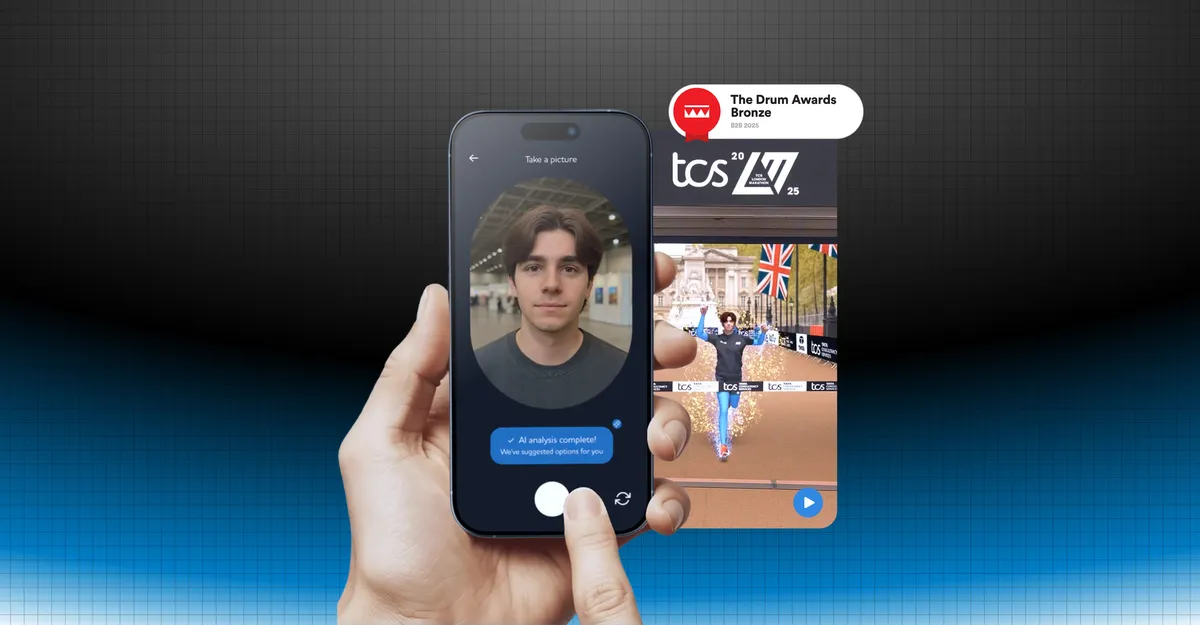
The most ambitious test of this I’ve been involved in was the TCS London Marathon activation . We needed photo-realistic footage of the iconic finish line: the Mall, Buckingham Palace, the finish tape. All without actual runners, so that 3D avatars could be composited into the scene. I started in Figma mapping user flows and layouts for the runner avatar app, then moved into Claude Code to build the front end and get the experience working in real time. For the finish-line environment itself, we used AI image tools and bespoke video technology to produce the final photo-realistic sequence. Over three days, we generated more than 1,500 personalised videos using nine different AI tools. The project won a Drum Award for Campaigns Powered by AI, and BBC News covered it.
Anmol Patel, Social Media and Insights Manager at TCS, put it simply:
What Fifty Five and Five built in the time they had was amazing.
Anmol Patel Social Media & Insights Manager, TCS
That project reinforced something I keep coming back to: the generation is the starting point. The real work, the thing that made those videos believable and engaging at scale, was everything that happened after the initial AI output. Good judgement and preparation at the post-processing stage is what separates polished results from generic AI imagery.
Why some designers are building their own AI creative tools
Some designers are moving from using AI tools to building them. When you hit the limits of what existing tools offer, the option now is to build something specific to your needs, and the barrier to doing that has dropped dramatically.
I’ve been getting stuck in on this at Fifty Five and Five. When generating blog imagery with tools like Midjourney and Sora, I kept running into the same issue: the output felt unfinished. Too flat, too clean. What was missing was texture, noise, and human character. So I built two small tools using Claude Code.
The first is a texture brush that lets me upload an image and use a texture sample as a paintbrush, with controls for grain, colour overlays, and noise intensity. The second creates pixelated versions of any image with adjustable colour palettes and pixel sizes. Together, they bring back the character that AI-generated visuals often lack. Neither tool is complex on its own, but they solve a specific creative problem that no off-the-shelf tool was addressing.
I know these effects can be created in Photoshop. But that’s not really the point. What I find exciting is that AI coding tools like Claude Code and Riff let me explore creative ideas that I wouldn’t have even considered building before. The distance between “I wish this tool existed” and “I’ve built it” has narrowed to a few prompts and some iteration. For a designer, not a developer, that’s a significant shift in what’s possible.
This connects to a broader pattern. Designers who have been made redundant or shifted careers are using AI development tools to start their own businesses. They have the tools to build and own products, not just design them. The conversation within our team reflects this too: there are a lot of people at Fifty Five and Five interested in experimenting with what’s now possible.
It connects back to the broader AI for designers evolution. Not just using tools, but building them. Not just creating assets, but creating the systems that create assets. A lot of this stuff is down to experimentation. The tools are accessible enough now that the biggest constraint isn’t technical skill. It’s having the curiosity to get stuck in and try.
Enjoying this article?
Get more B2B marketing insights delivered straight to your inbox.
Thanks for subscribing!
Which AI image generation tools should designers actually use?
The question was which AI image generation tools designers should use. The answer is that it depends on the use case, and most professionals use multiple tools. Midjourney for creative exploration, Adobe Firefly for production-safe assets within existing workflows, Sora and Nano Banana for video and photorealism.
But the tool is only part of it. What I’ve found through using these tools daily on real projects is that the workflow around them matters more than which specific tool you choose:
- Most designers use two or three tools for different purposes, not one tool for everything
- Post-processing is as important as generation: the raw output is never the finished product
- Understanding how the technology works helps you get better results from any tool
- The “too clean” problem is real, and design judgement is what bridges the gap between AI output and finished work
- Building your own creative tools is now accessible to designers willing to experiment
The landscape changes quickly, and what works today might not be the best approach in six months. Start slow to build understanding, then move quickly once you know what each tool does well for your projects. AI image generation isn’t something to default to without thinking. It’s something you consider, experiment with, and figure out the best way to use for the work you’re actually doing.
If you’re looking for AI-augmented design capability for your next project, get in touch .